Saturday, February 24, 2018
VBT Update 2/24/18

Monday, January 22, 2018
VBT Update 1/22/18
I've added serialization to the behavior tree. You can see a gif of saving and loading a tree out below. (Click to view full size)

I've opted to store the tree in a space separated value sheet with key value pairs, to keep the file size small. Other contenders are XML and JSON, but SSVs are easy to parse and there are no JSON parsing libraries included with Unity, and the overhead with XML doesn't seem worth it here.
Next time I'll be working on having the agent correctly run through the tree in-game, and perform what actions are specified. The "brains" of the operation. This will be tricky so I'll start with running through the tree each update loop, but later state-saving can be added to increase efficiency.
Monday, January 15, 2018
VBT Update 1/16/18
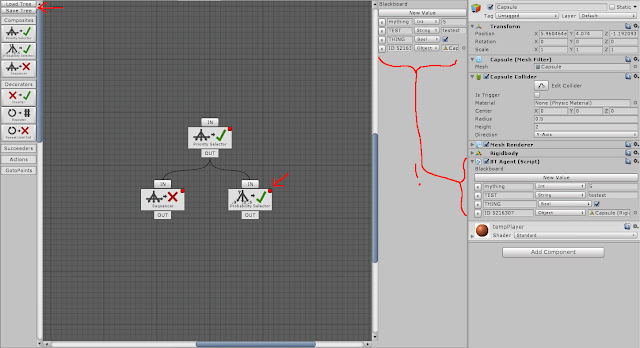
- Hooked up the VBT editor window with the inspector to both display the current Agent's blackboard
-The values carry over between them
-I've also added support for saving and loading files
- A few visual tweaks / usability
Next:
- Serializing/deserializing tree data
-The values carry over between them
-I've also added support for saving and loading files
- A few visual tweaks / usability

Next:
- Serializing/deserializing tree data
VBT Update 1/15/18
Blackboard support has been added to VBT. You can select a data type, name, and value to but used with the agent. A blackboard is a public collection of variables to be used and modified by an agent via it's behavior tree.
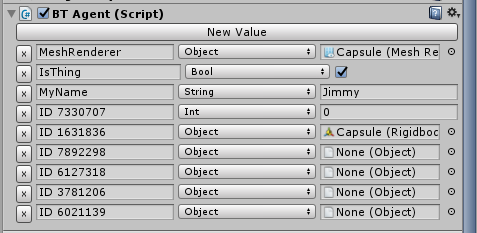
Next I will be integrating the blackboard with the behavior tree before hooking up the editor and backend.
Next I will be integrating the blackboard with the behavior tree before hooking up the editor and backend.
Thursday, June 8, 2017
"Cause" Game Update

New features:
Tanks can attack units of other teams
Units have health bars than show health
Units go away when out of health
New tank art
Mouse controls
Drag selection of units
Units have teams + colors for teams
Scaling unit selection boxes
Minimap w/ UI in place on right w scaling
Particle effects on tank firing
Damage particles on unit hit
Units aim top cannon at target when attacking, resets when done
Custom mouses that change when unit selected
Monday, June 5, 2017
"Cause" RTS Game
I've been working on an RTS game in Unity for fun. The idea is that you'll try to convert civilians to your side using various means of propaganda and subversion, and then create a force to crush the forces of the other ideologies.
Here's a screenshot thus:

More soon!
Here's a screenshot thus:

More soon!
Wednesday, October 26, 2016
Magic the Gathering Web Scrape
When building decks for Magic the Gathering, I like to use gatherer.wizards.com to find the cards, tappedout.net to build the deck and tcgplayer.com for pricing info. Unfortunately this can be time consuming, especially copying, pasting, and formatting each card name from gatherer.wizards.com to tappedout.net.
Fortunately I've written a python script that takes a gatherer.wizards search url as a string and then copies every card name to your clipboard, formatted correctly for mass entry on tcgplayer. Uses python 3.5.4 and BeautifulSoup which you'll need to install with pip.
Check it out on github
One weird quirk is that the string only stays copied to the clipboard while the script is looping for a few seconds (and thereafter if you paste it during this time), though the script gives you a window to paste at this point. Let me know anyone knows a better way to approach clipboard commands.
Subscribe to:
Posts (Atom)